
What to do today, and where is it written down
Promises come from everywhere: a call, a chat, an email. Where are they written down, in a notebook or in your head? A good CRM answers one question: what should I do today.
When requests come in at different times from different places, and I have a dozen live deals, I want every request to become a record with a due date and an owner right away, and to be reminded to get back to anyone who went quiet after a proposal, so that no deal is left hanging, and I never have to explain to a client or my boss why I forgot.
“Something just slips my mind,” managers themselves write (Habr). It isn’t about discipline. The promise had nowhere to go.
We recommend keeping a next step on every deal: an action, a due date and an owner. A deal without one has dropped out of management. In aitomaton every promise has this record.
What holds you to the old way, and what pulls you to the new
“Filling in 15 fields in a card before a call” (Habr): fearing a CRM like that is reasonable. Whether to switch is your call.
The request stayed in a conversation. A proposal has gone two weeks without an answer: “the client is thinking”, although everyone forgot about them. The CRM gets filled in for a report, not for yourself.
Every inquiry goes straight into a record with a due date and an owner. One “for today” list. A client went quiet after a proposal: a task to follow up arrives, and before the due date you get a reminder a day before and 2 hours before.
15 fields again before a call. Will I manage without a programmer. Will the system start writing to clients for me. It doesn't write to clients, and you edit the fields yourself from the browser.
Excel, a notebook and task boards work while there are few clients. You can go step by step: upload a spreadsheet from Excel and open only the list of your own tasks.
The path of one request: from incoming to outcome
One inquiry in aitomaton
- InboundA request comes in
From a messenger (the channel is connected as a separate module) or added by hand. A deal appears right away, and a task to get in touch appears in your list. An hour without a touch: one more arrives.
- RecordThe record collects everything
The client, deal, amount, stage, tasks, comments and change history in one card. The owner gets a notification.
- Follow-upGetting back to the quiet one
After a proposal, three days of silence: a task to ask about the decision. A week: decide the fate of the deal. Nothing is sent to the client.
- OutcomeThe outcome in the record
A loss: record the reason. A win: hand the order over to work. The board and charts are calculated from the same records.
The numbers: where they come from and how they differ from your case
There are no publicly available Kazakhstani studies specifically about CRM. Each number is labeled with where it comes from and how it differs from your situation.
How it relates to your taskAll organizations, with no split by size and no line about CRM. But it is the closest open measurement: four out of five work without process automation.
How it relates to your taskAll industries, not sales departments.
The exact dynamics of returning clients depend on your niche, your average ticket and your deal cycle. The task funnel and reminders help you see the next step on each deal.
What this gives your business
- What it means for youA request with no owner and no due date goes unanswered even when people are trying.What aitomaton does about itA new request immediately creates a task to get in touch; an hour without a touch creates one more.ValueA request doesn't go cold in silence.
- What it means for you“Forgot” says something about how work is organized, not about you.What aitomaton does about itReminders a day before and 2 hours before; a deal card with history and comments.ValueReturn to a deal from where you left off, without digging through chats.
- What it means for youWorking from a spreadsheet and memory is common. Switching is nothing to be embarrassed about, and it doesn't have to happen all at once.What aitomaton does about itA ready “B2B sales” funnel and importing clients from Excel, CSV, JSON.ValueYou don't start from an empty screen.
- What it means for youData from spreadsheets and chats has to be reconciled by hand.What aitomaton does about itOne record per inquiry: client, deal, tasks, history; server-calculated numbers on the board and in the charts.ValueThe picture across deals is built from records, without a manual summary.
- What it means for youFor someone who already reached out, the contact and history are already there to return to.What aitomaton does about itThree days of silence after a proposal create a task to ask about the decision, and a week creates a task to decide the deal's fate.ValueReturning to a familiar person becomes a task in a list, not a matter of memory.
- What it means for youAfter a win or a loss, a history remains that you can return to.What aitomaton does about itTasks after a win and after a loss: hand over the order, record the reason, confirm the source.ValueThe client history stays for the next touch.
Three screens of the working day
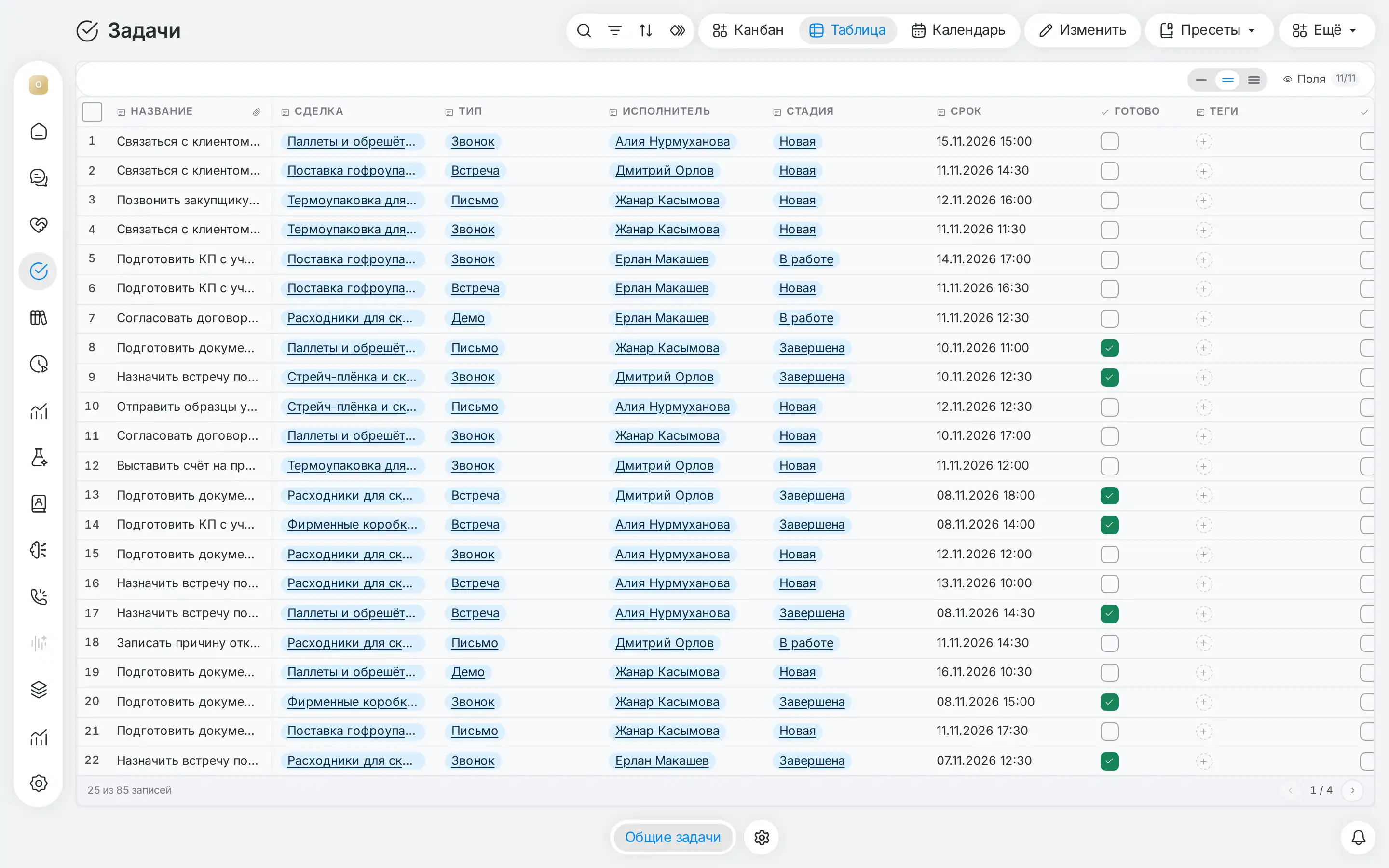
List
The task table /t/Tasks: due date, a “Done” checkbox, stage, owner and type (call, meeting, email, demo). Sort by due date, filter by owner or status, search. “My today” takes a couple of clicks to put together.
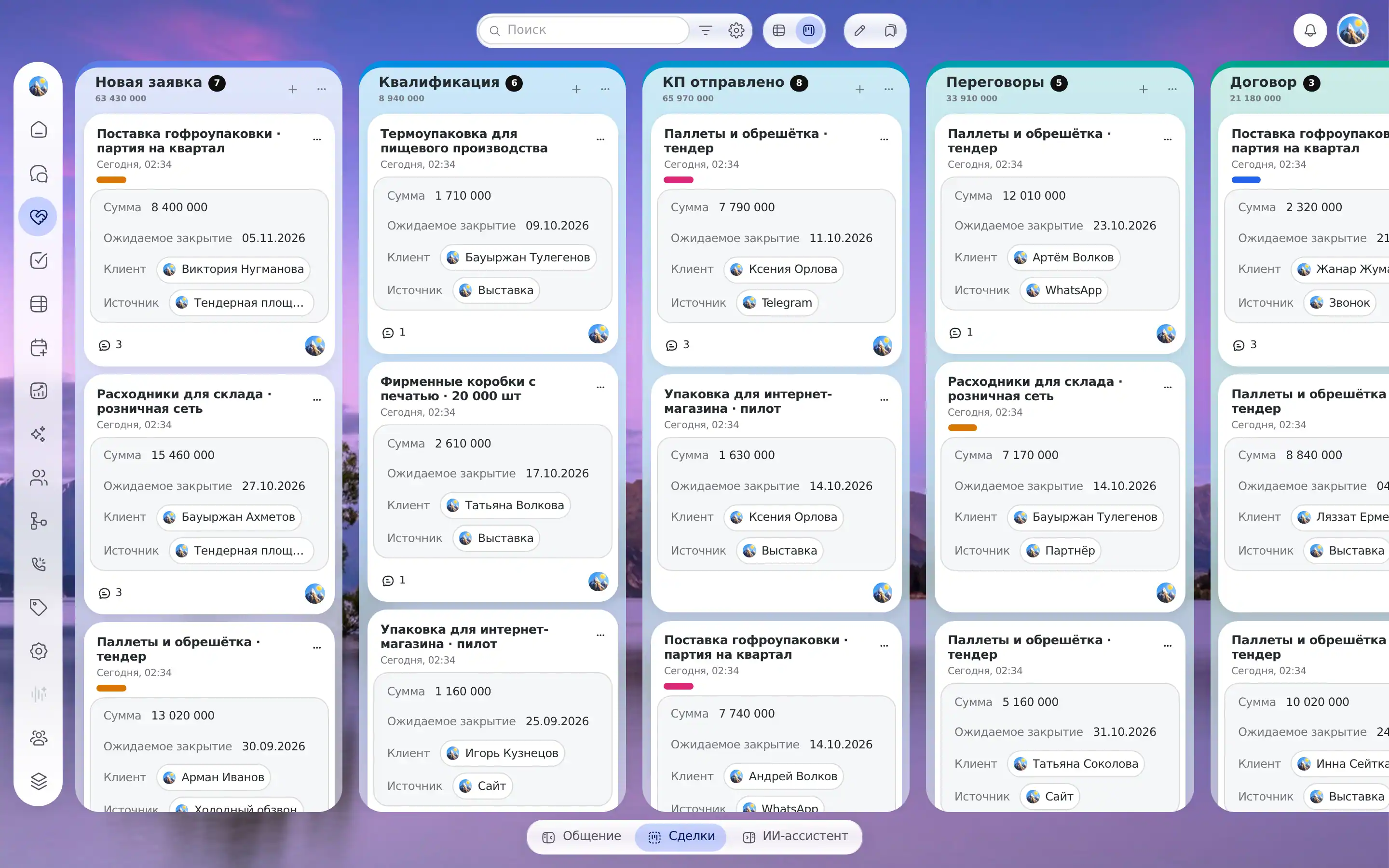
Board
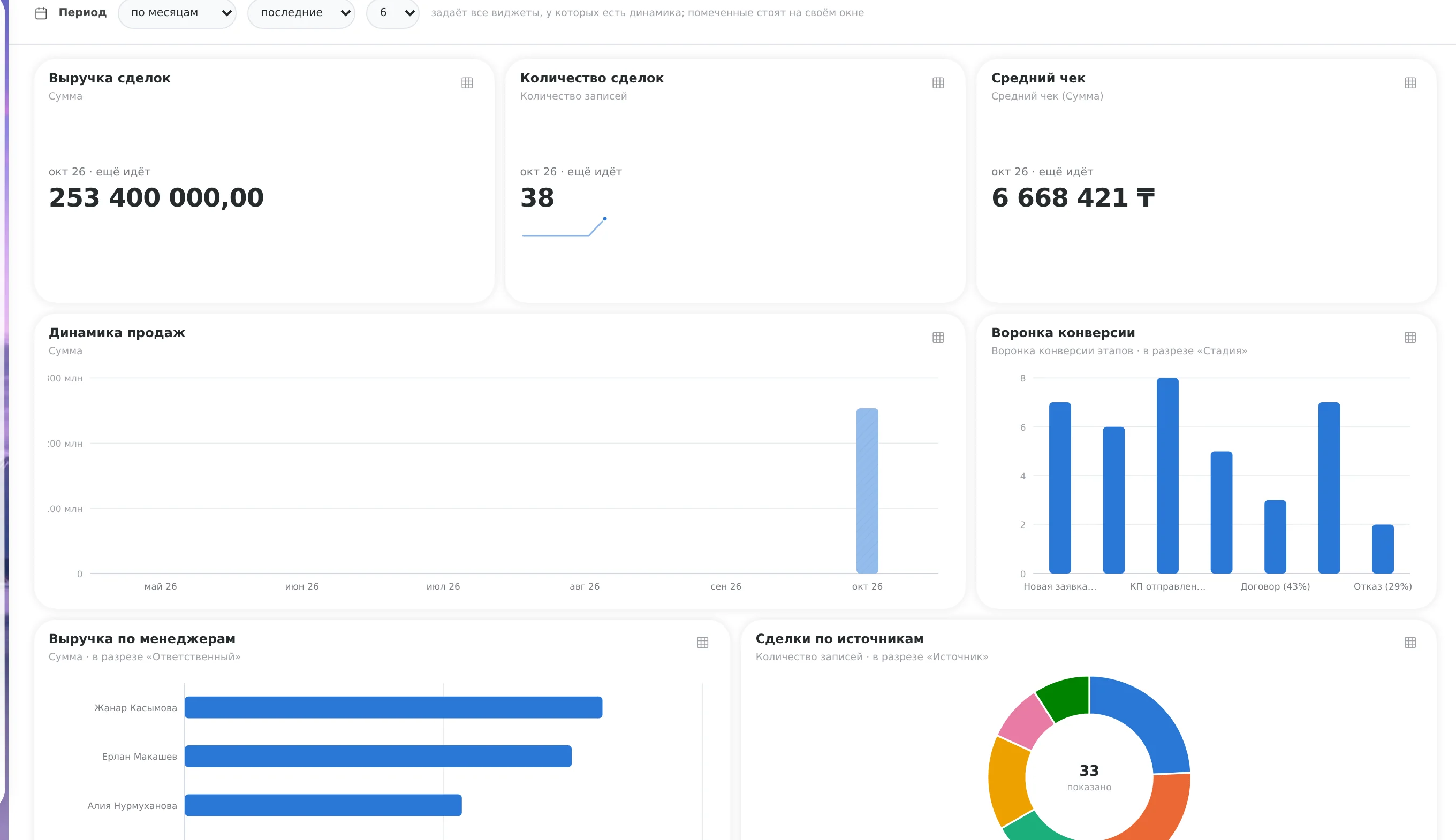
The /k/Deals page: deals by funnel stage. The column header shows the number of deals and the total, and the server counts them across all deals, not only the ones that fit on the screen. You drag a card to the next stage, and the value is saved at once.
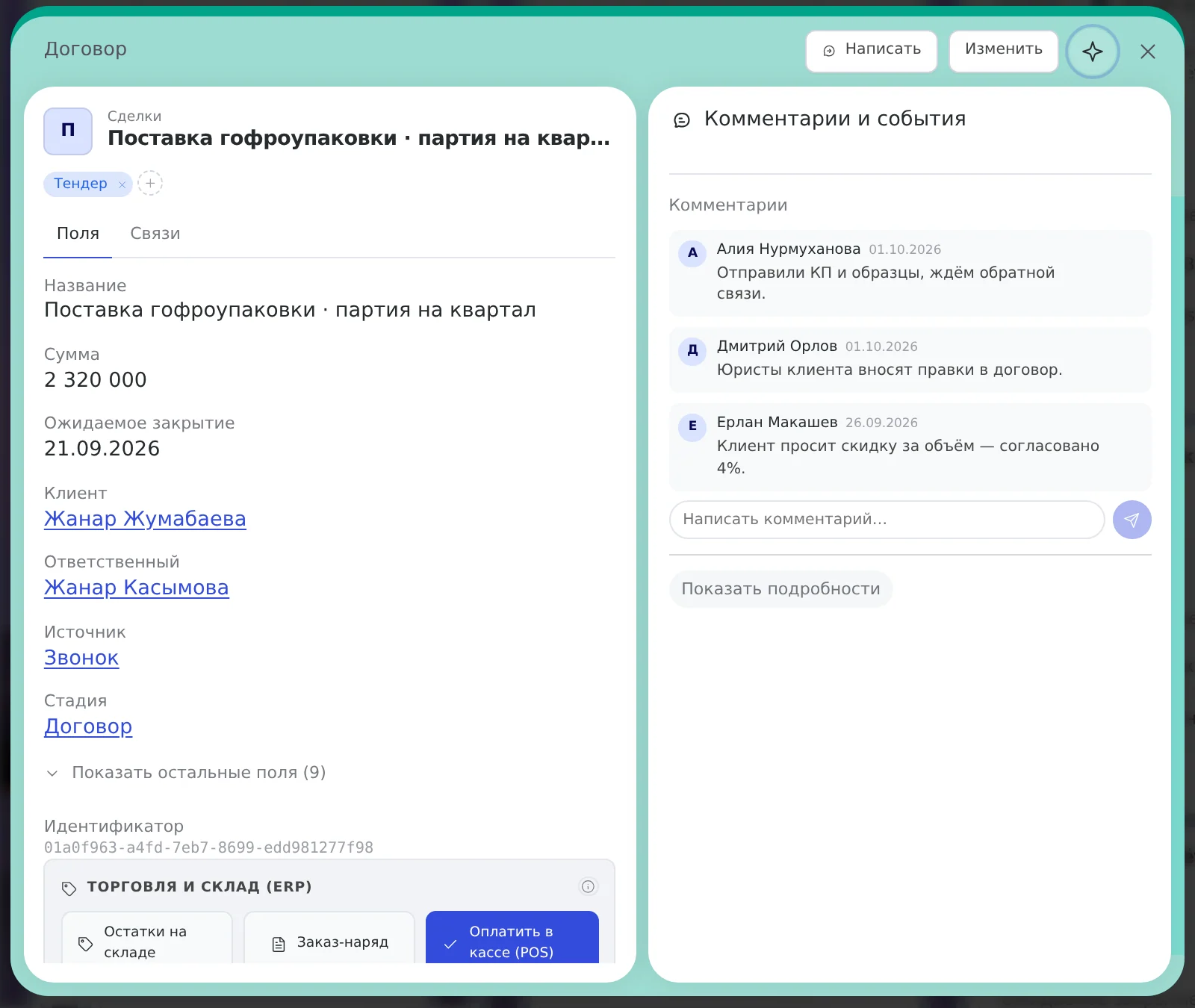
Deal card
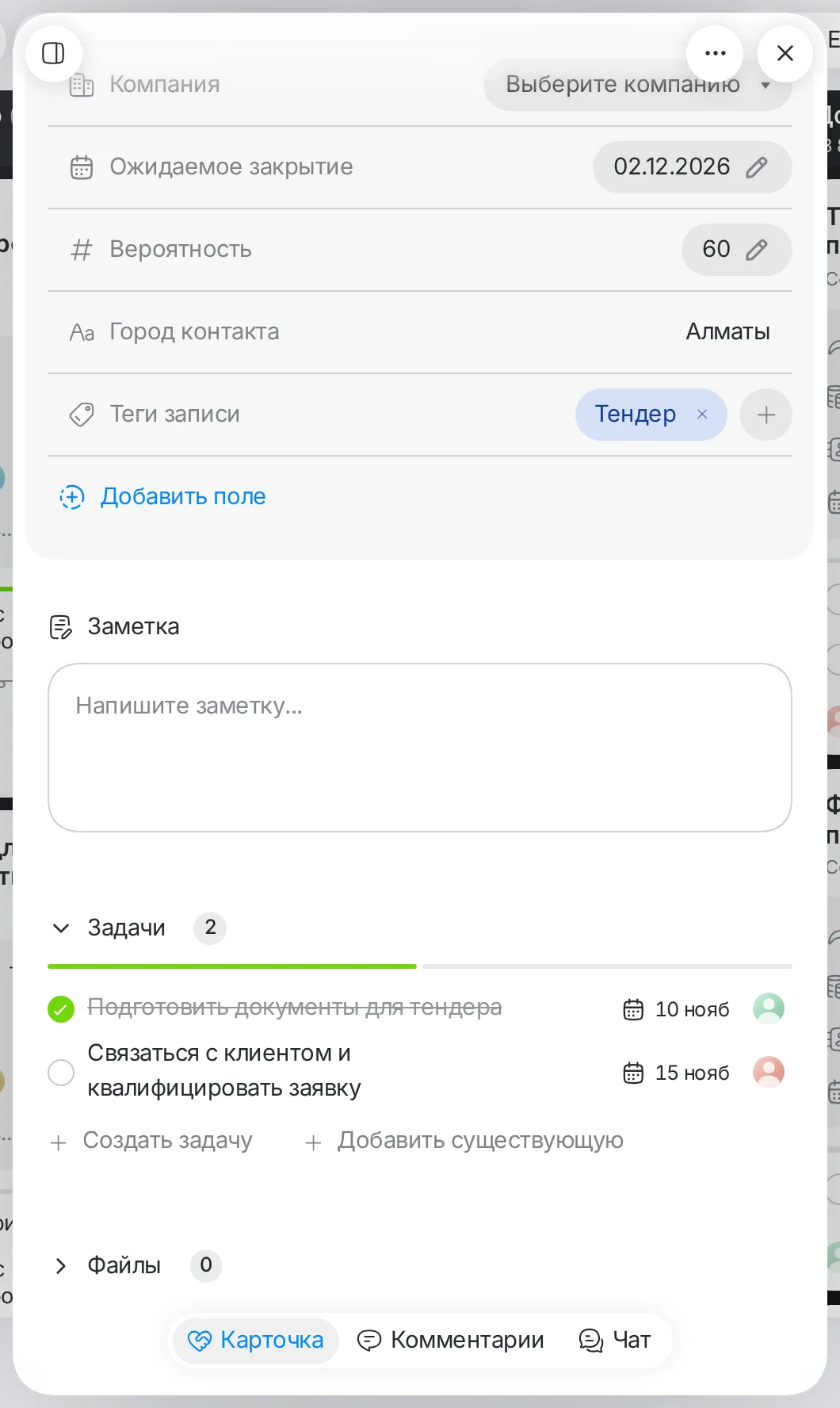
Tasks, comments, change history, the client, past deals. You can recall what was agreed without leaving for another section.
You assign a deal or a task: a notification arrives in the app and, if you like, in the browser. Before the due date you get a reminder a day before and 2 hours before; if you move the date, the reminders are recalculated.
A client went quiet after a proposal: what the CRM does
A repeat touch here is a task for you: to get back to someone who already reached out or received a proposal. The system doesn’t send the client an email. It remembers the rules, not you. This is the “B2B sales” preset, and the rules in it can be changed.
- Proposal sentA task to record the next step and the date to get back to the client.
- The client is silent for 3 daysA task to ask about their decision. After a week of silence, there will be a task to decide the fate of the deal.
- The deal moved to “Negotiations”A task to check terms and timing. Negotiations last more than two weeks: a task to figure out what is going on and set a step.
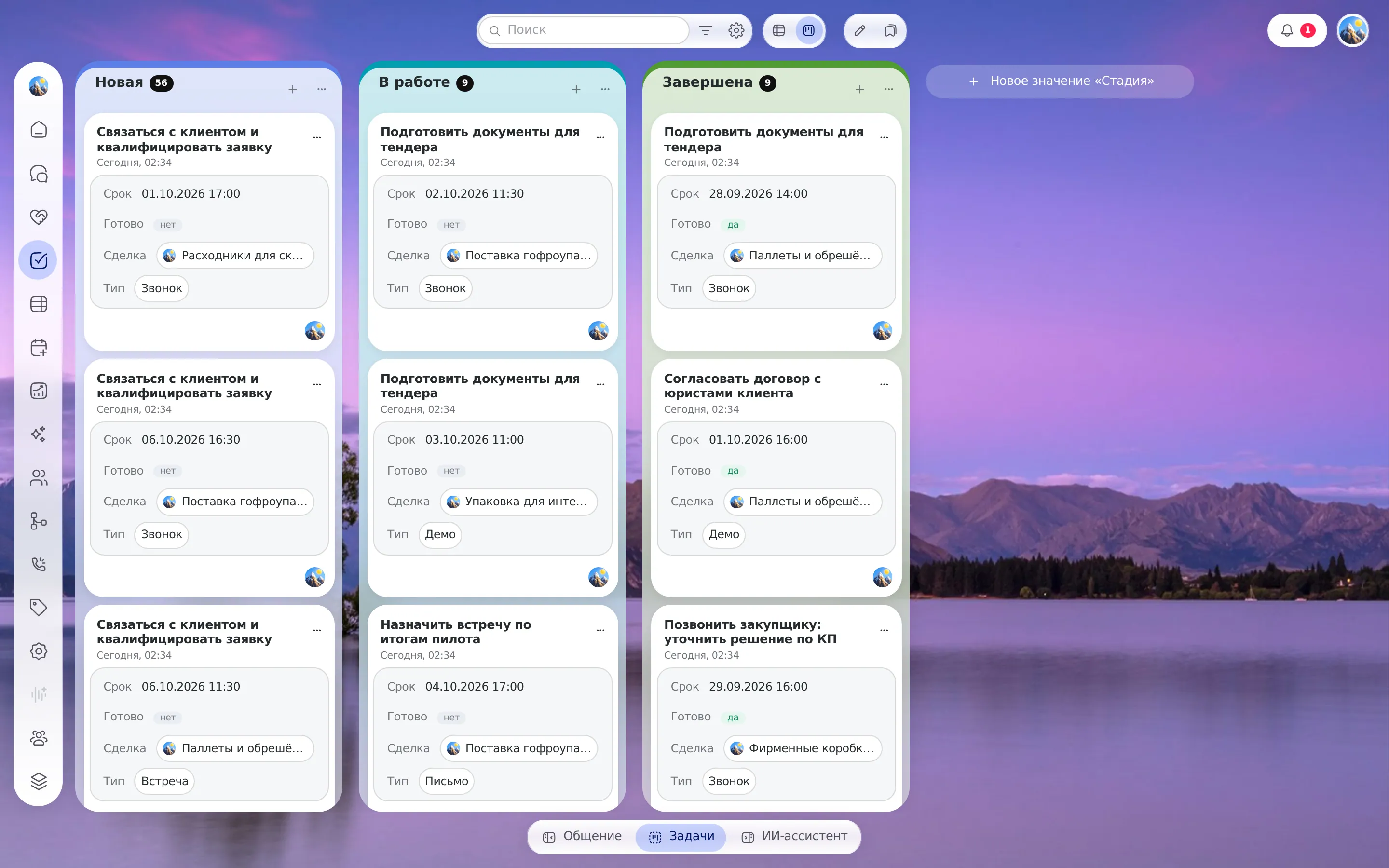
The interface for controlling tasks and deals
Real screens for managing a team's work: a task kanban with deadlines, a deal funnel, a client card and reports.
How much time goes into manual records and reminders?
“We’re here to sell, and you make us do paperwork!” (vc.ru). Count how much paperwork and “remembering” your team does. The arithmetic runs on your numbers and is not a forecast.
Team hours spent on manual records and reminders
How we calculate: people × (minutes on records + minutes on reminders) × days ÷ 60, for a week — 5 days. Assumption: the calculation shows your current time costs based on your numbers, not a promised saving. This is arithmetic on your numbers, not a promise of results.
What else the platform can do, and where its limits are
Fields and tables from the browser
You add a field, a relation or a calculated field in the model settings. It is in the list and the form right away, and a deleted one can be restored.
Everyone sees their own
Presales sees deals without amounts, an observer sees the funnel without money. If something isn’t allowed, the screen explains why.
Import from Excel
CSV, XLSX and JSON: you map columns, and the records are created. Exporting the current view is also available. Testing on files with hundreds of thousands of rows is still under way: ask about that volume at the demo.
How is this different from general-purpose CRMs and ordinary task boards?
The task tracker in aitomaton is focused on the task of a commercial team: getting a deal to payment without losing the next step.
| Tool | Strength | Where it may not fit |
|---|---|---|
| Simple sales CRMs | A simple interface, auto-tasks at stages | No projects or document flow in one window |
| General-purpose platforms | A very wide set: CRM, tasks with a Gantt chart, a portal | Longer to learn; often excessive for a small team |
| CRMs with a free tier | A low entry barrier and a large ecosystem | Free plans have limits on users, contacts and funnels; for Kazakhstan, price and language matter |
| CRMs for online sales | Funnels, kanban, tasks in cards | Oriented to online sales; check whether it fits your model |
| Task boards | Convenient boards; a funnel can be built from cards | No client base and no totals by stage out of the box, deals are just tasks |
| aitomaton | Tasks tied to deals, next-action prompts, due date reminders, server-side totals | Focused on sales and service (not overloaded with extra project sprints) |
For IT development and complex project teams there are specialized sprint trackers. For sales departments and service centers, task discipline across deals is what matters.
A “for today” list in four steps
- Open the demoOr try it free for 3 days and pick the “B2B sales” preset. Check the stage names.
- Add your own fieldsSource, client type. Only what you use during a call.
- Upload your clientsFrom Excel or CSV, mapping the columns.
- Open the task listFilter by yourself and by due date: that is your “today”.
After a week, in the morning you have one list open: whom to call, which deal’s due date has come. If chats and the assistant are connected, it works with your permissions and sees no more than you do. It takes the routine off you, and the decisions stay with you.
What else to look at
Requests from messengers reach the CRM through the shared channel inbox, and routine client questions can be handled by an AI agent in chat. Is it easier for a client to book than to get on a call? See online booking. Selling education: a funnel for an online school. A car dealership: a preset for a dealer.