
The slot sat empty, and the client booked where they got an answer
By morning she is booked somewhere else. On Thursday the slot is empty.
The opposite happens too: they booked, and the person didn’t come. “People simply don’t get the notifications and don’t show up” (a review of an online booking service, April 2026). And when “I’m the administrator and the specialist” (also a review, February 2025), there is no time for reminders.
When late in the evening a client writes “any opening on Thursday?” and I'm in the chair or already at home, I want to have her offered free slots and booked right away, and have the complicated cases left to me or the administrator, so that she doesn't go to whoever answered first, and the booking and its outcome stay in one place with me.
Evening messages and no-shows: statistics and patterns
Some bookings arrive when the administrator is unavailable.
How it relates to your taskThe volume of the whole industry nationwide, not your business revenue and not an estimate of no-show losses. It shows the scale of a services market where clients book and choose whom to message.
How it relates to your taskA different industry, but it also runs on booking classes and services. Market volume, not your revenue.
The reply comes three hours later, the slot sits empty, and you write confirmations by hand.
The client gets a reply right away. The schedule and outcomes are in one place, and you can see what no-shows cost.
“What if the agent books the wrong slot or says something silly?” It offers only free slots under your rules, in test mode no booking is created, and anything contentious goes to a person.
“It works as it is.” You can start with one channel and test mode.
How one booking goes
- InboundA request comes at any time
The client writes at 11:07 PM. The agent picks the service, the specialist and the time from free slots and books.
- RecordThe booking and its outcome in one place
The booking lands in the calendar, the client card and the deal. The database doesn't allow a double booking of a specialist or a room. The outcome: completed, canceled, no-show.
- Follow-upA service touch inside the booking
Service confirmations and reminders inside a booking are ready in a development branch and turned off by default. Today the agent reschedules and cancels a booking at the client's request.
- OutcomeThe result is visible without counting
The slot is filled, freed by a cancellation or marked as a no-show. The analytics reflects specialists' current workload and the visit trend.
Three steps in one dialog
A service, a specialist and a time from the free ones, a name and a phone number. The booking engine calculates the time, and the model only asks it.
- Customer · 21:12Hello! I'd like a haircut on Thursday after 6 PM.
- AI assistantHello! Diana has 6:30 PM and 7:30 PM open, and Ruslan has 7:00 PM. Whom would you like?
- CustomerDiana, 7:30 PM.
- AI assistantI've booked you for Thursday, 7:30 PM, a haircut, 60 minutes. What is your name and phone number?
- CustomerAliya, +7 7XX XXX-XX-XX. And can I reschedule if my plans fall through?
- A question outside the schedule rules → passed to the administrator
- Staff memberHello Aliya, this is Aigul, the administrator. Rescheduling is possible, and I'll suggest some options.
- ServiceFrom the catalog: duration, price, who it is available to.
- Specialist and timeSlots are taken from the engine, accounting for the schedule, lead time, buffer and room.
- ConfirmationA booking with a name and a phone number, linked to the client card.
The agent reschedules and cancels the person’s own booking. If a visit is already marked as completed or a no-show, it doesn’t touch it: it states the outcome and offers a new booking. Channels: WhatsApp and Telegram are confirmed in the documentation; Instagram and VKontakte are stated on the website, so confirm the status of the channel you need at a demo. More: AI agent for chats, a single incoming flow.
What the client, the administrator and the specialist see
Client
Books through a dialog in a messenger; the agent names only free slots.
In development: a booking page by link and a website widget, service confirmations and reminders inside a booking, a review link after the visit.
Administrator
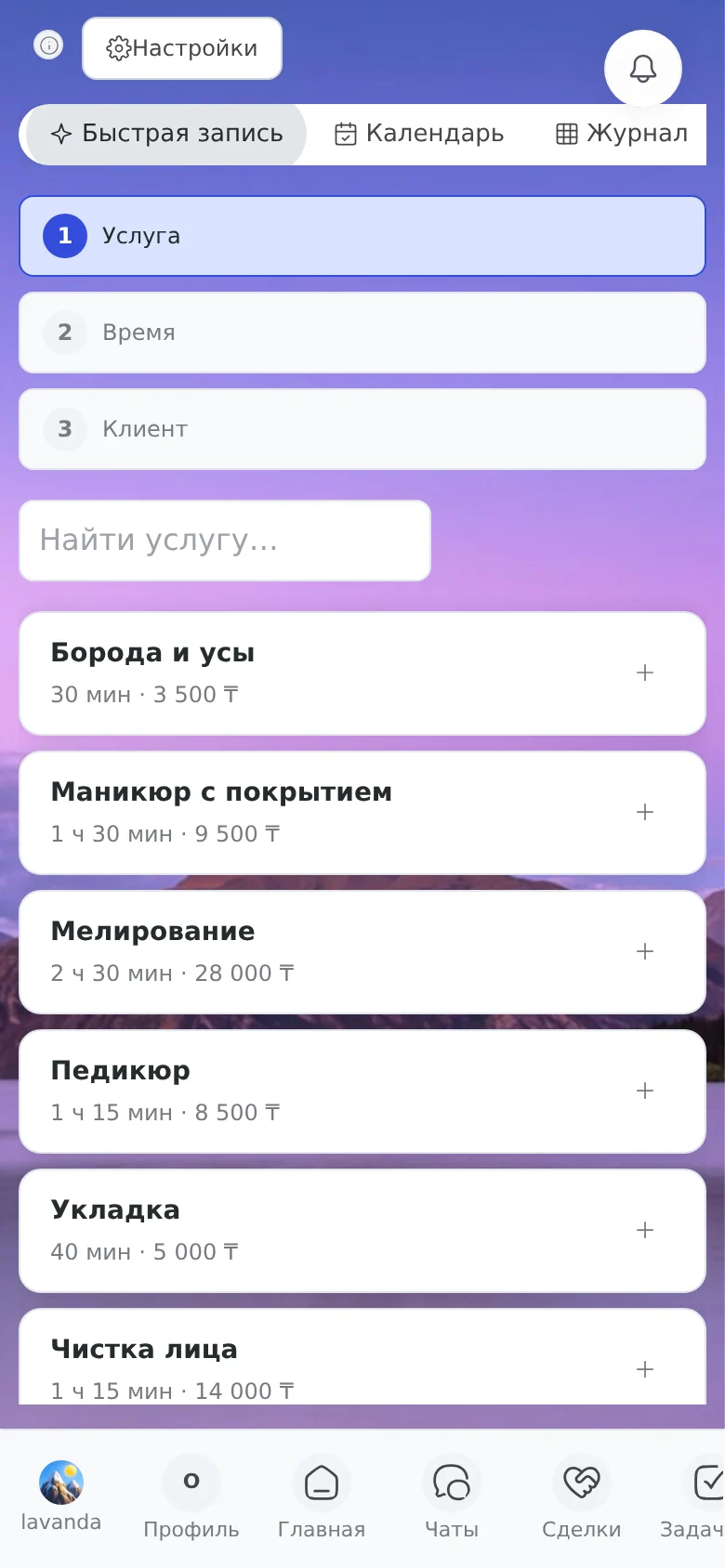
A “day / week / month” calendar, a log, quick booking “service, time, client”, visit outcomes, analytics with a “Losses from no-shows” tile. Only the administrator has the right to book outside the rules: outside a shift or over capacity.
In development: a waitlist and recurring bookings.
Specialist
A staff member with the “accepts bookings” flag: their own schedule, their own services, and blocks occupy their schedule like bookings.
In development: a “specialist sees only their own” role. For now, visibility is set by role permissions.
What you set up yourself
Catalog
Duration and price, buffer, seats for groups, a link to a room.
Weekly and shift-based
“Two on, two off” cycles, exceptions for a date, lunch.
Rooms and bays
The database doesn’t let a specialist’s and a room’s busy time overlap. Blocks: a sanitary break.
Completed, canceled, no-show
Your own names and colors; a cancellation frees up the time.
Slot rules
Time zone, grid step, lead time before a booking, horizon.
Online booking module features
The platform combines the administrator’s working calendar and an AI agent that books clients in messengers during the hours you set.
| Feature | Description and purpose |
|---|---|
| AI agent in messengers | Taking and setting up bookings in WhatsApp and Telegram during the hours you set, in natural language |
| Schedule and calendar | “Day / week / month” grids, a log of appointments, quick booking by the administrator |
| Resources and locations | Rooms, service bays, sanitary breaks; the database doesn’t let a specialist’s and a room’s busy time overlap |
| Service and price catalog | Duration, cost, technological breaks between procedures |
| Analytics | Specialist workload, a breakdown by service and losses from no-shows |
| A single client card | Dialogs and booking history in one client card in the CRM |
Booked, but the client forgot
Often it is “forgot” rather than “didn’t want to”, and that is familiar to anyone who has booked clients.
If you look for the fault only in the client, some causes go unnoticed, British researchers reminded in 2026 (NIHR Open Research). After a no-show you need to get back without reproach and offer an easy reschedule. Owners want “book and forget”, so that reminders go out by themselves (a review of an online booking service, June 2026).
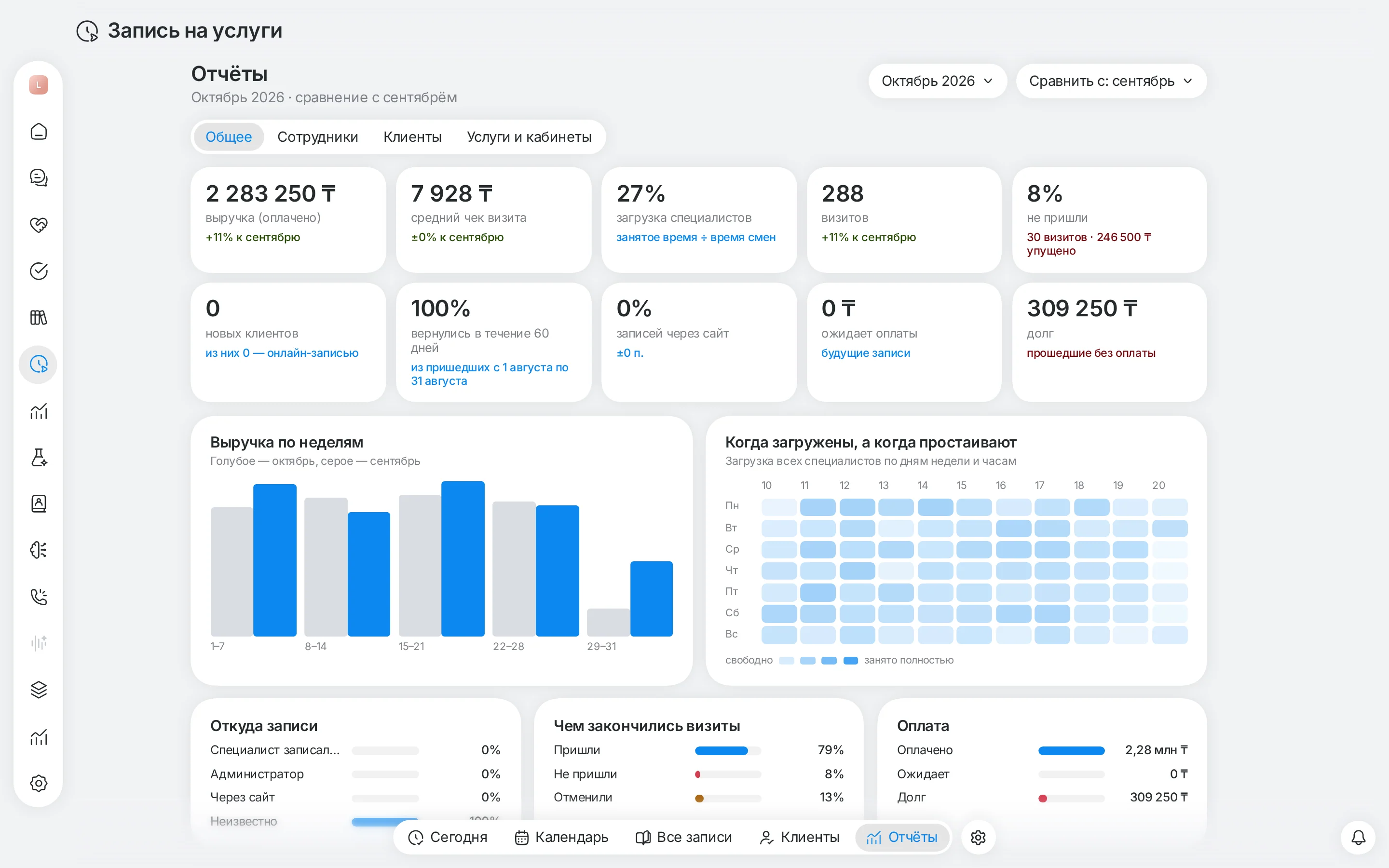
Today every booking has an outcome, and the analytics has a “Losses from no-shows” tile and a breakdown by specialist and service. In the beauty salon preset (a draft), a no-show creates a task for the administrator: to get back to the client and offer a new time.
The online booking and analytics module interface
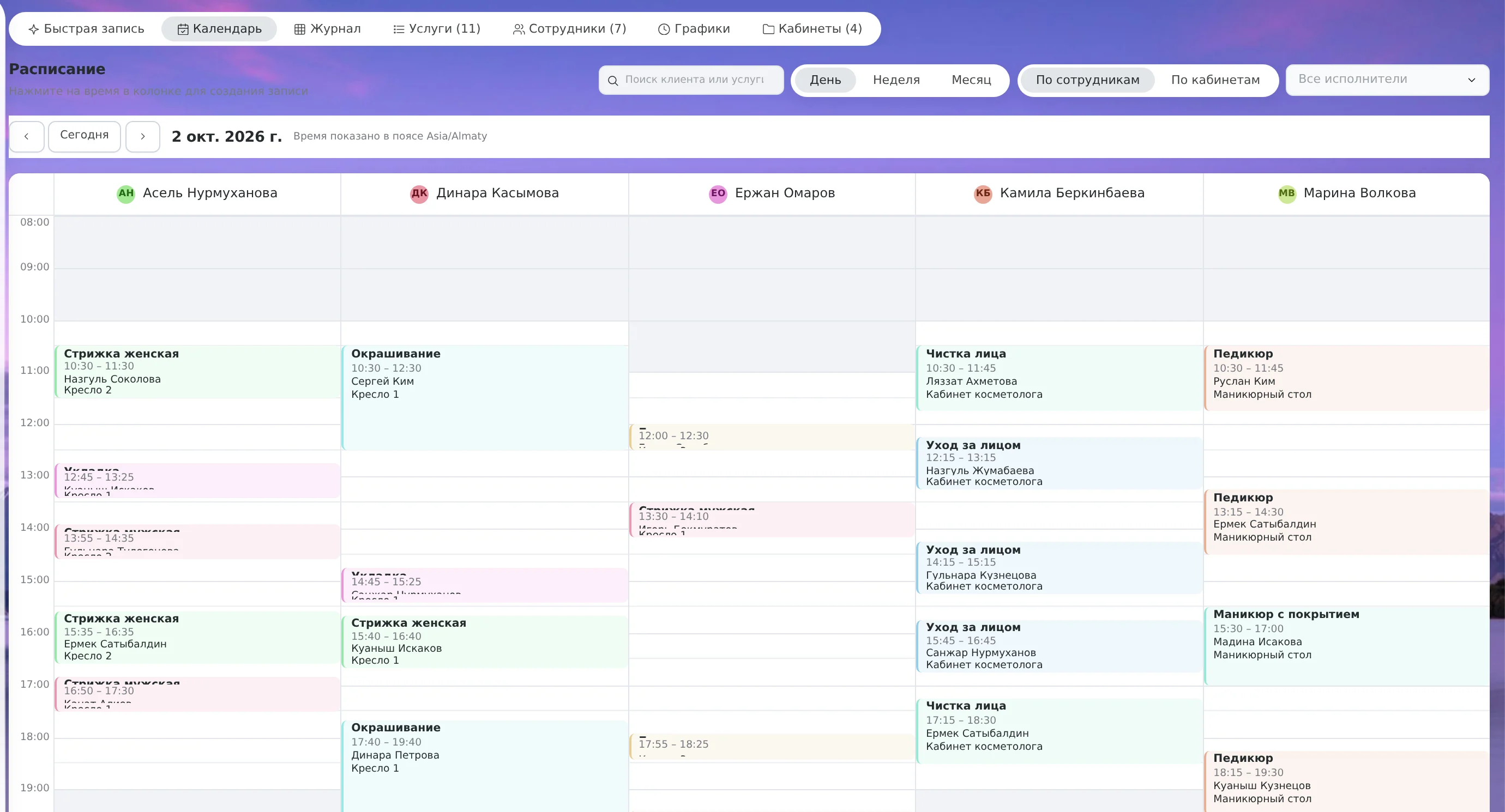
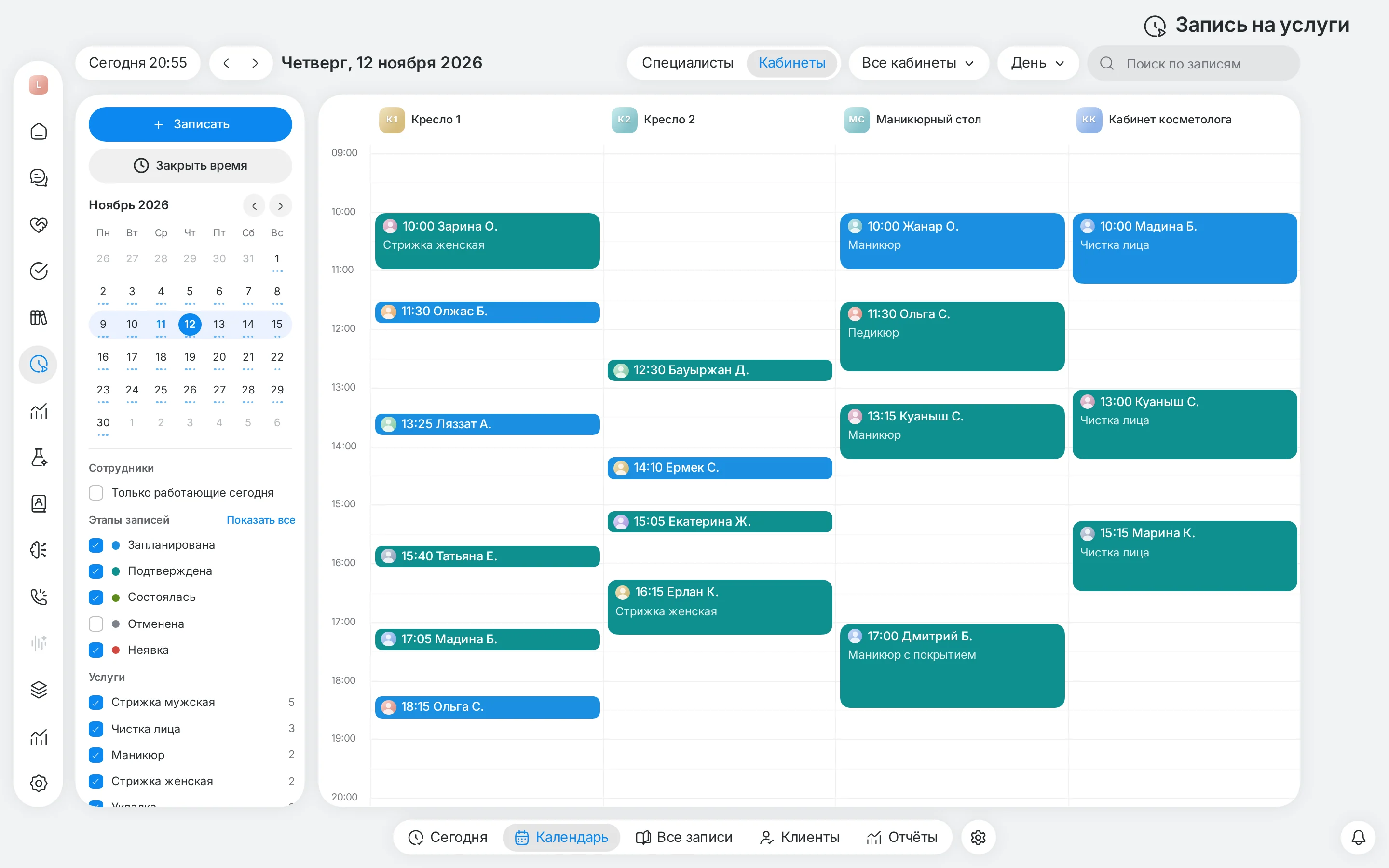
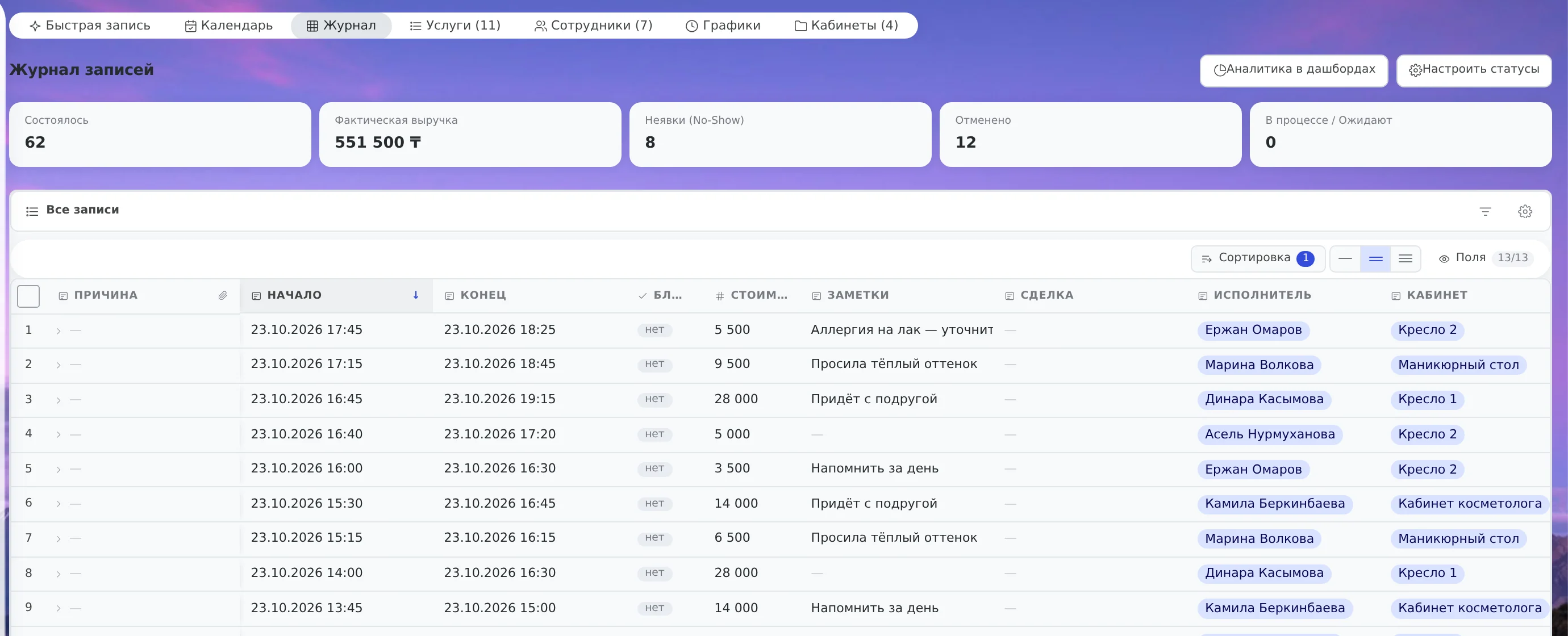
Real screens of the booking module: a day grid by specialist, a visit log, a workload dashboard and mobile entry.
How many slots sat empty for you last week? Enter your own numbers.
What no-shows and empty slots cost per week
How we calculate: bookings × specialists × days × no-show share × ticket plus empty slots × specialists × days × ticket. Assumption: each no-show and each empty slot costs one average ticket and wasn't filled by another client. This is arithmetic on your numbers, not a promise of results.
What this gives your business
- What it means for youSome bookings come outside opening hours.What aitomaton does about itThe agent in WhatsApp and Telegram books into free slots under your rules.ValueAn evening message gets a reply during the hours you set.
- What it means for youA slot that was given up can be offered to another client.What aitomaton does about itA cancellation frees up the time.ValueA freed slot is visible again and available to the next request.
- What it means for youThe outcome of every booking has to be recorded to see the losses.What aitomaton does about itThe outcomes “completed / canceled / no-show”, the “Losses from no-shows” tile.ValueThe picture of no-shows is assembled without a notebook or manual counting.
- What it means for youPart of no-shows is about memory, not discipline.What aitomaton does about itConfirmation and a reminder inside the booking (24 hours before) are ready in a branch, turned off by default.ValueEven now the log shows what “forgot” costs.
- What it means for youThose who cannot come need a simple way to cancel or reschedule.What aitomaton does about itThe agent reschedules and cancels a booking in the chat; after a no-show it states the outcome and offers a new time.ValueSomeone who can't come says so in the chat, and the specialist's time is freed up.
- What it means for youAgainst forgetfulness, a reminder inside the booking is needed.What aitomaton does about itService reminders inside the booking card: in development, turned off by default.ValueFor now a person follows up with someone who didn't come. Your result will be your own.
A notebook and messengers versus one system
| Without a system | With aitomaton |
|---|---|
| Booking in messengers and by phone, the administrator replies by hand | The agent replies in the chat and books under the schedule rules |
| The schedule in a notebook or in your head | One calendar: day, week, month, by specialist |
| “Does Thursday suit you?” and ten messages | Three steps: service, specialist and time, confirmation |
| No-shows are visible only by feel | Outcomes and losses from no-shows are counted in analytics |
| A contentious case sinks in the chat | The agent hands off to a person, and the administrator sees the history |
Dialog booking and booking by link: what’s the difference
Many online booking services offer the client an external link or a form. The aitomaton agent books the client right in the dialog:
- Booking inside the messenger. The client doesn’t need to follow links and register: the booking is set up in WhatsApp or Telegram.
- A dialog instead of a rigid form. If the needed time is taken, the agent offers other free slots.
- The module’s boundary. The module has no cash desk, payroll or inventory: if you need them, keep them in a separate program.
Where to start
- Connect a channel: WhatsApp, Telegram or another. WhatsApp needs a WABA.
- Install the Service Booking module: services, specialists, schedules, rooms.
- Test the agent in test mode: no booking is created, but you see what it would have offered.
- Turn the agent on in the channel and watch outcomes and no-shows in the analytics.
For beauty there is a ready set of settings: beauty salon. For doctors’ rooms: clinic, for bays: auto service.
Security and the agent’s rules of work
The agent has no right to break the established schedule rules. The platform’s database controls the busy time of a specialist and a room. The agent works only with the current client’s bookings, and a booking outside the rules, complaints and disputes stay with the administrator.